Workspace notifications are email updates about new file uploads and file updates in a Workspace. Available notification frequencies include:
- Never (no email notifications are sent - the default setting)
- Daily (a summary of updates is sent at the end of the day)
- Immediately (an email is sent for every new file update)
Notification frequency can be managed individually by collaborators, or on behalf of collaborators by Workspace Owners and Managers.
Collaborators
Workspace collaborators manage their own notification frequency from the settings modal within each Workspace.
Workspace Owners and Managers
Workspace Owners and Managers can configure notification settings on behalf of their collaborators from the Collaborators tab within each Workspace. However, note that if a collaborator prefers a different notification frequency, they can update their own setting at any time from the Workspace settings.
Workspace Owners and Managers can:
- Set notification preferences when adding new collaborators
- Update notification settings for existing collaborators
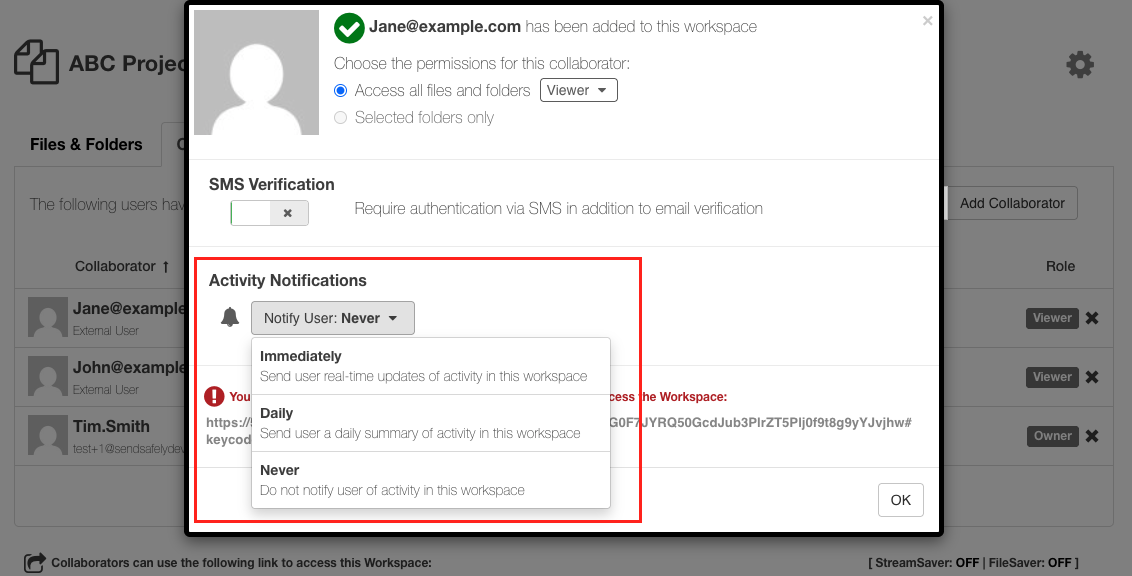
When a notification setting is updated by an Owner or Manager, the collaborator will receive an email informing them of the change. Therefore, when adding new collaborators, it is important to share the secure Workspace link promptly. That way, the collaborator will have access to the Workspace right away, along with the notifications configured for them.
Collaborators who are limited to subfolder-only access are not eligible to receive Workspace notifications.
Comments
0 comments
Article is closed for comments.